Sharing Billing Access
Why you might need this
The person evaluating Report URI is often not the person who can pay for it, and the person who needs the invoices is often neither of them. Rather than passing your password around or copying invoices out by hand, you can send a link that opens your billing portal directly for whoever handles your billing.
They do not need a Report URI account and they do not sign in. The link opens the same Stripe-hosted billing portal you see when you click Launch Billing Portal, so card details go straight to Stripe and we never see the card number.
Creating a link
Go to the Billing page and find the Share the Billing Portal panel, underneath the Billing Portal panel.
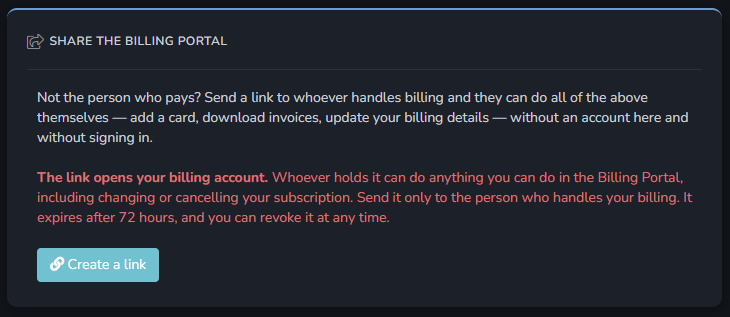
Click Create a link and the URL appears with a Copy button next to it.
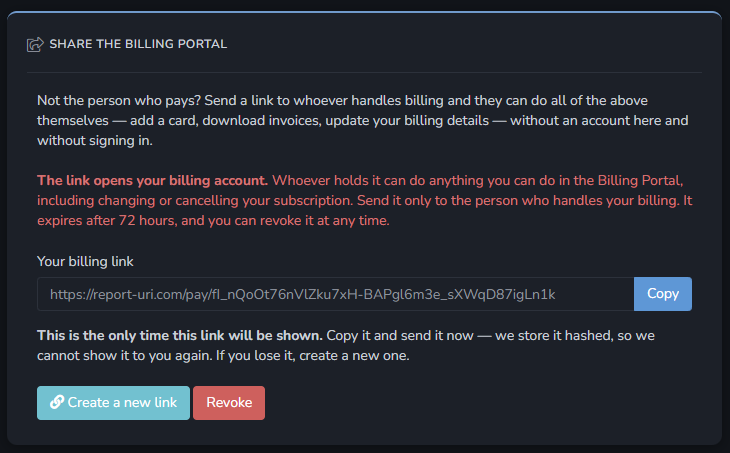
You are only shown the link once
Copy the link and send it straight away. We store it hashed, in the same way we store a password, which means nobody can read it back afterwards — not you, and not us. Reloading the page shows only the date it was created.
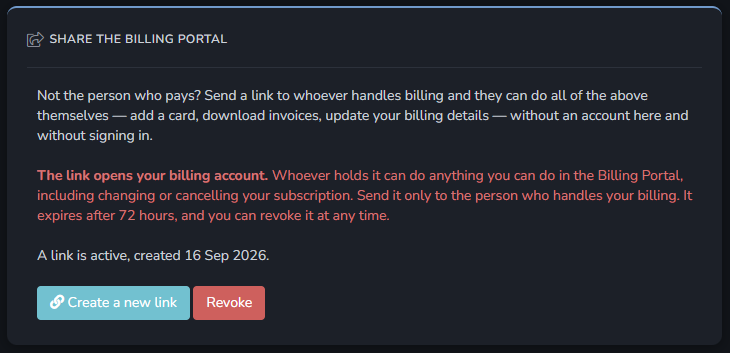
If you lose the link, click Create a new link. This immediately stops the old link working, so anyone still holding it gets a "not found" page.
What the person you send it to can do
Everything you can do in your billing portal. There is no cut-down version of the portal for shared links, so be clear about what you are handing over before you send it:
- Add, update or remove a payment card
- View and download every past invoice as a PDF, including the names, addresses, amounts and tax IDs on them
- Change or remove your billing address and tax ID
- Change your plan
- Cancel your subscription
This is why the panel warns you in red. Send the link to the person who handles your billing, and nobody else. If it ends up in a shared mailbox or gets forwarded down a mail thread, everyone who can read that thread can do all of the above.
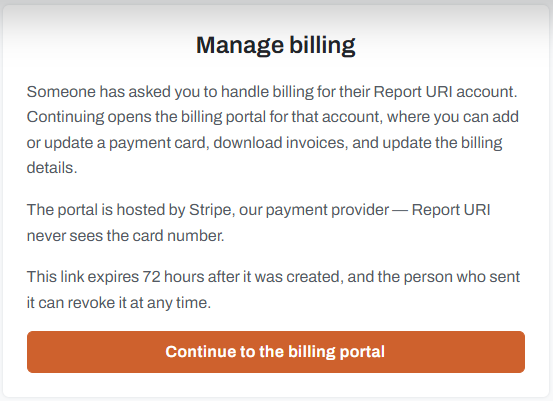
Here is what they see when they open it:
What it does not give them
The link only opens the billing portal. It does not:
- Sign them in to your Report URI account
- Give them access to any of your reports, graphs, policies or settings
- Let them see or change your account email address, or add users to your team
Invoices and receipts also keep going to the account owner's email address, not to whoever you sent the link to. They can download every invoice from the portal, but they cannot change who future ones are emailed to.
Expiry and revoking
A link stops working 72 hours after you create it. There is nothing to do at that point; it simply starts returning "not found".
That is deliberately short. The link can cancel your subscription, so it is not something to leave lying around in a mailbox for a week, and creating a replacement is a single click if it does lapse before your colleague gets to it. Send the link when you know the person is expecting it rather than well in advance.
You can stop a link working sooner at any time by clicking Revoke on the Billing page. Creating a new link does the same thing to the previous one.
It is worth revoking a link once the person has finished with it, rather than leaving it to expire on its own. A link that has been used is not automatically used up — it keeps working for the rest of the 72 hours.
Common questions
Can you resend me the link I created?
No. We store it hashed, so there is genuinely no copy of it anywhere for us to look up. Create a new link instead, which also revokes the old one.
Why can I not see the Share the Billing Portal panel?
Creating a link needs the same things as opening your own Billing Portal, because a link is that portal: an active subscription on a self-serve plan, and you signed in as the account owner rather than a team member. Enterprise plans are billed directly and do not use the portal at all.
Revoking is separate, and deliberately outlives all of that. If a link is still live, the panel stays on the page with a Revoke button on it even once you can no longer create new ones — otherwise a lapsed subscription would leave you with a link out there and no way to kill it. So if you have an outstanding link you will always be able to reach the button that cancels it.
The person I sent it to says the link is not found
The link has expired, been revoked, or been replaced by a newer one. Create a new link and send that instead.
They see "there is nothing to manage here"
The link is fine, but the account is no longer in a state where its Billing Portal can be shared — usually the subscription has ended, or it has moved to a plan billed directly rather than through the portal. Sort that out and the same link starts working again, as long as it has not expired in the meantime.
The page deliberately does not tell them which of those it is. They have no account with us, and the state of your subscription is not theirs to read.